The Project Status section in Orangescrum Cloud allows you to define how project progress is tracked across your organization.
Each project passes through different phases — from initiation to completion — and using clear, consistent statuses helps your team and stakeholders understand where each project stands.
Example: A marketing agency might use statuses such as “Planning,” “Execution,” and “Completed,” while a construction firm could have “Design Approval,” “Procurement,” and “Site Work.”
Why Use Project Status
- Consistency: Maintain uniform progress stages across all projects.
- Visibility: Instantly identify where each project stands.
- Tracking: Simplify reporting and filtering by project status.
- Customization: Tailor default statuses to match your team’s workflow.
Accessing Project Status Settings
- Go to Settings → Company Settings → Project Status.
- You’ll see two sections:
- Default Project Status — Predefined system statuses like Started, Completed, On Hold, and Stack.
- Custom Project Status — Statuses you can create based on your organization’s workflow.
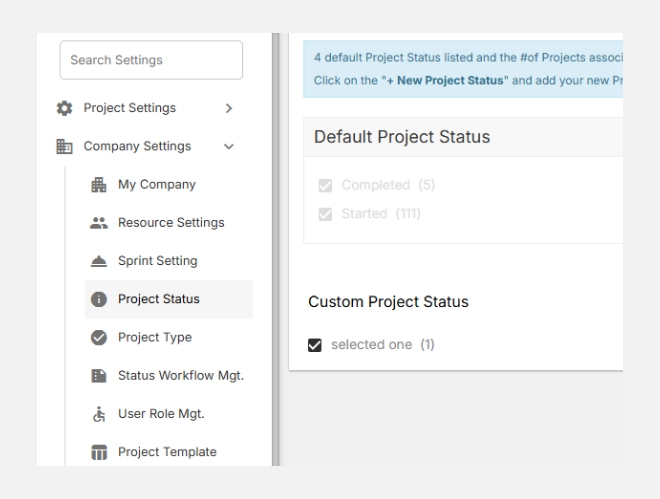
Custom Project Status
Custom statuses allow you to define additional lifecycle stages unique to your company or domain.
For instance:
- For a Legal Firm: File Organization, Trial Preparation, Case Closure
- For a Software Company: Requirement Gathering, QA Review, Release Pending
- For a Construction Team: Design Approval, Procurement, Site Execution
Each custom status provides greater control and visibility over specialized workflows.
Adding a New Project Status
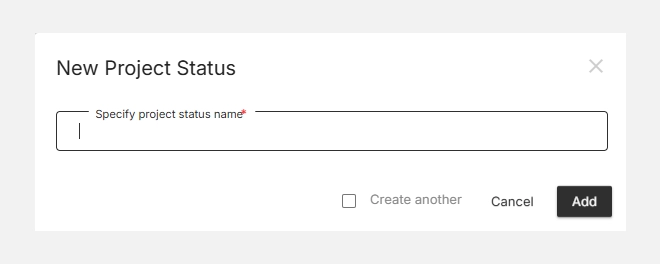
- Click + New Project Status in the top-right corner.
- Enter the name of your new status (e.g., Client Review or Final Documentation).
- Click Add to add it to your list.
Your new status will appear under Custom Project Status and can be assigned to any active or future project.
Editing or Removing a Status
- To rename or modify a custom status, click the status name and make your changes.
- To remove a status, uncheck it or delete it from the list.
(Default statuses cannot be deleted.)