Supported OS, Database, Web Server, and PHP

Supported OS, Database, Web Server, and PHP Versions

Orangescrum is compatible with both MySQL/MariaDB and PostgreSQL database stacks, depending on your edition and licensing.

For MySQL/MariaDB Deployments

  • Web Server: Apache 2.4
  • PHP: 8.2
  • MySQL: 8.x
  • WKHTMLTOPDF: 0.12.5 (for reports and PDF exports)
  • cURL: Enabled

For PostgreSQL Deployments

  • PostgreSQL: 15.14 or later (EPAS or Community Edition)
  • pgAdmin: 8.x for monitoring and administration
  • PostGIS Extension: 3.4 (optional, for geospatial modules)
  • psql CLI: 16.x (bundled with server)
  • pg_dump / pg_restore: 16.x for backups and restores
  • libpq: 16.x (PostgreSQL client library)
  • OS Support: RHEL 9 / CentOS Stream 9 / Ubuntu 22.04

Recommendation: Ubuntu Server 22.04 or Debian 12 are ideal for production due to stability and package compatibility.

Ensure that PHP extensions like pdo, mbstring, gd, and zip are installed before running setup.

Hardware & Resource Requirements

Orangescrum can run on a variety of server setups—from a single-node instance for small teams to multi-node clusters for enterprise workloads. Below are the recommended configurations.

Option 1: Linux Server (Preferred)

Level CPU (Cores/Threads) RAM Storage OS Processor NAS / Network
Basic 2C / 4T 64 GB 2 TB SSD (SATA) Ubuntu Server 22.04 Intel Xeon E-2224 1×10GbE NIC + SATA NAS
Mid 4C / 8T 96 GB 2 TB NVMe + 2 TB HDD Ubuntu Server 22.04 AMD EPYC 7232P Dual 10GbE + RAID
Advanced 8C / 16T 128 GB 4 TB NVMe (RAID 1) Debian 12 / Proxmox Intel Xeon Silver 4310 Dual 10GbE + Hot-Swap NAS Bays

Tip: For optimal performance, use NVMe or SSD storage for both application and database directories. HDDs can be used for backups or file attachments.

Option 2: Windows Server (Alternative)

Level CPU RAM Storage OS Processor NAS Provision
Basic 2C / 4T 64 GB 2 TB SSD Windows Server 2022 Std Intel Xeon E-2236 10GbE + SATA NAS
Mid 4C / 8T 96 GB 2 TB NVMe + 2 TB HDD (RAID 1) Windows Server 2022 Std AMD EPYC 7232P NAS-ready RAID Controller
Advanced 8C / 16T 128 GB 4 TB NVMe (RAID 10) Windows Server 2022 Std Intel Xeon Silver 4310 Dual 10GbE + Hot-swap NAS

Use Case: Windows is suitable for organizations running Active Directory or IIS-based stacks, but Linux is strongly recommended for Docker, Kubernetes, and LAMP/LEMP installations.

System Requirements Summary

Component Recommendation
Load Balancer 1 instance (Nginx/HAProxy)
Application Server 1 or more instances
CPU Dual quad-core or higher
Memory ≥ 64 GB
App Directory 100 GB
Attachments ≥ 1 TB
Application Logs 1 GB+
Database Server 1 instance, ≥ 64 GB RAM, ≥ 1 TB storage
Auxiliary Server (Dashboard/Wiki) 1 instance, ≥ 64 GB RAM, ≥ 500 GB storage

The Application, Database, Dashboard, and Wiki can all be hosted on a single powerful server for small to mid-sized teams.

Infrastructure

Prerequisites & Infrastructure

Before installing Orangescrum Self-Hosted, it’s essential to prepare the right server environment, software stack, and network configuration. This ensures that your deployment runs smoothly, securely, and efficiently—whether it’s a local machine, private datacenter, or cloud-based VM.

This section outlines the recommended hardware, OS, database, and network requirements for different scales of deployment.

Getting Started

What Is Self-Hosted Orangescrum?

Orangescrum Self-Hosted (or On-Premises) edition is a fully controllable deployment of the Orangescrum project management platform within your own IT infrastructure.

Instead of relying on Orangescrum Cloud, where your data is hosted and managed by our servers, the self-hosted version lets you install the entire application—database, backend, and frontend—on your own servers, VM, or private cloud environment.

It gives you complete authority over your deployment stack, data governance, and integration policies. You decide the environment—whether it’s an on-premises Linux server, Windows Server, or containerized cloud setup via Docker, Kubernetes, or Proxmox.

A self-hosted setup includes everything that powers Orangescrum Cloud:

  • Application services (frontend/backend)
  • Database (MySQL/MariaDB or PostgreSQL)
  • File storage and attachments
  • Email, notifications, and automation services
  • Security, SSL, and user-access controls

In short, you’re running Orangescrum in your own data center or private cloud, with full administrative control.

Benefits of Self-Hosting Orangescrum

While the cloud version is ideal for teams seeking plug-and-play simplicity, many organizations—especially those in government, IT services, construction, healthcare, and financial sectors—prefer self-hosting for deeper control, compliance, and integration flexibility.

Here’s why:

1. Data Control & Privacy

All your project data, tasks, attachments, and user details stay within your infrastructure. This ensures compliance with internal IT policies, ISO/IEC 27001, GDPR, or regional data-sovereignty mandates.

2. Customization & Integrations

You can extend the Orangescrum core with custom modules, modify configurations, or integrate directly with internal ERP, HRMS, or reporting systems—something not always possible in multi-tenant cloud environments.

3. Performance Optimization

You control CPU, RAM, and storage provisioning. High-performance NVMe disks or tuned PostgreSQL instances can drastically improve large-scale project load times.

4. Security & Compliance

You decide your authentication methods, SSL policies, firewalls, and access control layers. Many organizations integrate with LDAP/AD or SSO providers for centralized identity management.

5. Cost Efficiency at Scale

For teams with 100+ users, self-hosting can significantly reduce long-term subscription costs compared to SaaS pricing. You pay once for the license and manage hosting internally.

6. Long-Term Sustainability

With version-controlled deployments and database backups, your system continues to operate even if external connectivity is interrupted. It’s ideal for air-gapped or restricted environments.

Use Cases — When to Choose Self-Hosting

Choosing between Orangescrum Cloud and Self-Hosted depends on your operational model, compliance needs, and scale. Here are common scenarios where self-hosting shines:

  • Enterprise IT Teams needing full DevOps control and on-prem integration.
  • Construction & Infrastructure Firms managing multiple sites under strict client data agreements.
  • Government and Public Sector organizations operating in isolated or controlled network environments.
  • Software Development & DevOps Agencies that customize Orangescrum workflows, build custom plugins, or embed APIs.
  • Financial, Healthcare, and Defense Institutions requiring audit trails, encryption policies, and zero external data exposure.
  • Private Cloud Deployments (AWS EC2, Azure VM, Google Cloud VM, or OpenStack) where admins prefer dedicated control with auto-scaling flexibility.

If your organization values customization, compliance, and control more than convenience, Orangescrum Self-Hosted is the perfect fit.
Import and Export

Moving project data from one tool to another can feel like a nightmare. Hours of manual entry, mismatched columns, broken timelines… It’s not fun.

This is where Orangescrum Imports makes things easy!

With Imports, you can bring everything over — Milestones, Sprints, Epics, Features, Stories, Tasks, Subtasks, Estimations, Due Dates, Timelogs, Project Plans, Templates, Budgets, Test Cases, and more — without typing it all in again. Just upload a file, and Orangescrum does the heavy lifting for you.

Sounds good? Let’s walk through it.

Why Use Orangescrum Imports?

Think about it:

  • You don’t need manual typing, which saves hours of boring data entry.
  • Onboarding is easy, so you can get started quickly with ready projects.
  • Bulk upload lets you move thousands of tasks in just minutes.
  • The process ensures accuracy by reducing human errors with a clean, pre-formatted template.
  • Your project data stays consistent and neatly aligned with Orangescrum’s structure.
  • You get flexibility to migrate from spreadsheets, tools, or even databases.
  • The system scales with you, whether you’re importing one project or an entire portfolio.
  • Data consistency is maintained, keeping all your historical records intact.
  • You save costs by reducing manual effort, errors, and rework.
  • Time-saving imports let you focus on execution instead of setup.
  • The process is future-proof since you can re-use templates whenever you want.

Whether you’re switching from another project management tool, moving away from messy spreadsheets, or setting up a brand-new workspace, Imports makes the process smooth.

What can you import to Orangescrum?

  1. Tasks
  2. Timelogs
  3. Customers
  4. Epics
  5. Test cases
  6. Task templates

Import Tasks

  • Login to your Orangescrum account.
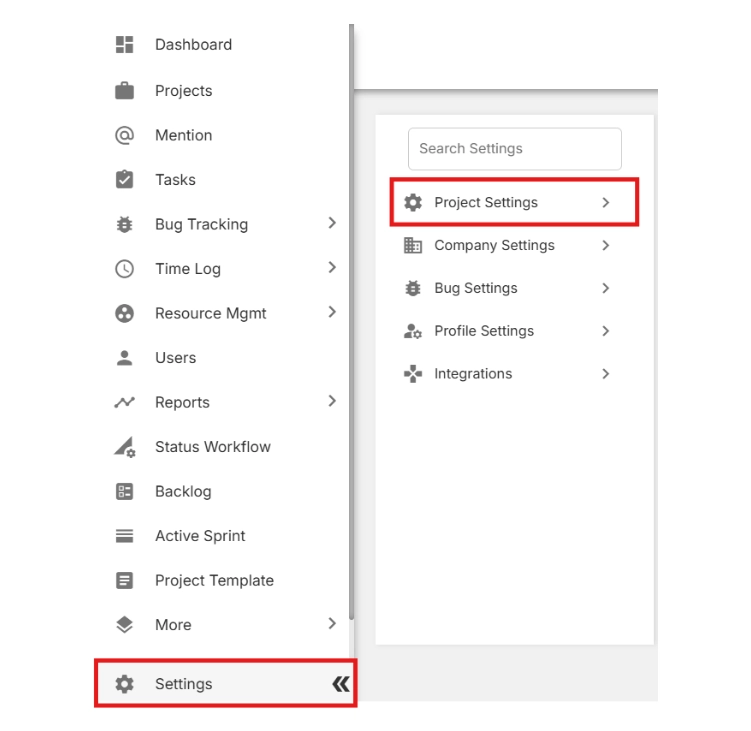
  • From the left-side menu, scroll to the bottom and click Settings.
  • Select Project Settings.

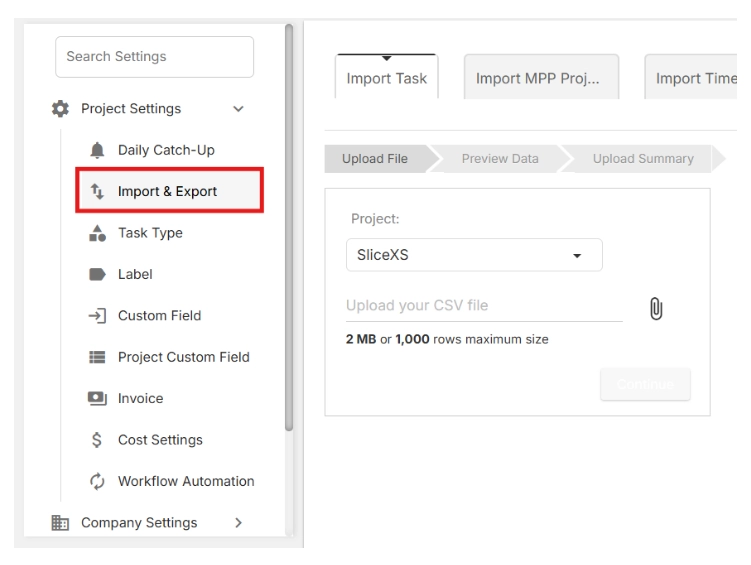
  • Click on Import & Export.

🔎 This is where you can both download the import template and upload your project data later.

  • Click Download the sample file.


Contact Support

We’re here to help — anytime you need assistance.

Overview

Whether you’re new to Orangescrum or a seasoned project manager, help is always just a click away.

The Support section gives you quick access to tutorials, help documents, FAQs, and direct assistance from our team — so you can resolve issues faster and keep your projects running smoothly.

Orangescrum Support is available for all users — from Free plans to Enterprise customers.

Where to Find Support

You can reach the Orangescrum Support team through multiple channels:

1. Help Center (Knowledge Base)

Explore detailed step-by-step documentation on every Orangescrum feature at the help portal.

You’ll find:

  • Product guides and tutorials
  • Troubleshooting articles
  • FAQ sections
  • Best practice resources

Start with our “Getting Started” and “Academy” modules for a guided learning experience.

2. Orangescrum Academy

Learn project management the Orangescrum way!

Our Academy portal offers in-depth training modules, including:

  • Agile project management
  • Time tracking & reporting
  • Video tutorials and product demos

Perfect for new users, admins, and teams who want to master productivity in Orangescrum.

3. Email Support

For issues requiring personal assistance or workspace-specific troubleshooting contact support@orangescrum.com

When emailing, please include:

  • Your workspace URL
  • A short description of the issue
  • Screenshots (if possible)
  • Your browser/device details

Our team responds within 24 business hours (faster for Enterprise users).

4. Enterprise Priority Support

If you’re on an Enterprise or Self-Hosted Plan, you get access to:

  • Dedicated Account Manager
  • Priority Ticket Resolution
  • Live Onboarding & Training Sessions
  • Custom Integration Support

Your team will have direct guidance from Orangescrum specialists.

How to Submit a Support Ticket

  1. Go to Help → Contact Support in the left navigation or bottom widget.
  2. Fill out the quick form:
    • Subject
    • Description of issue
    • Attach files or screenshots (optional)
  3. Click Submit Ticket.

Once submitted:

  • You’ll receive a confirmation email with a ticket number.
  • Our support representative will reach out within one business day.
  • You can reply directly via email to continue the conversation.

Keep your workspace active during troubleshooting for faster diagnosis.

Data & Privacy Support

  • All support requests are handled securely.
  • Your workspace data remains private and protected.
  • Only authorized personnel access your workspace for troubleshooting (with your consent).

We adhere to strict GDPR and data-protection standards.