Moving project data from one tool to another can feel like a nightmare. Hours of manual entry, mismatched columns, broken timelines… It’s not fun.
This is where Orangescrum Imports makes things easy!
With Imports, you can bring everything over — Milestones, Sprints, Epics, Features, Stories, Tasks, Subtasks, Estimations, Due Dates, Timelogs, Project Plans, Templates, Budgets, Test Cases, and more — without typing it all in again. Just upload a file, and Orangescrum does the heavy lifting for you.
Sounds good? Let’s walk through it.
Why Use Orangescrum Imports?
Think about it:
- You don’t need manual typing, which saves hours of boring data entry.
- Onboarding is easy, so you can get started quickly with ready projects.
- Bulk upload lets you move thousands of tasks in just minutes.
- The process ensures accuracy by reducing human errors with a clean, pre-formatted template.
- Your project data stays consistent and neatly aligned with Orangescrum’s structure.
- You get flexibility to migrate from spreadsheets, tools, or even databases.
- The system scales with you, whether you’re importing one project or an entire portfolio.
- Data consistency is maintained, keeping all your historical records intact.
- You save costs by reducing manual effort, errors, and rework.
- Time-saving imports let you focus on execution instead of setup.
- The process is future-proof since you can re-use templates whenever you want.
Whether you’re switching from another project management tool, moving away from messy spreadsheets, or setting up a brand-new workspace, Imports makes the process smooth.
What can you import to Orangescrum?
- Tasks
- Timelogs
- Customers
- Epics
- Test cases
- Task templates
Import Tasks
- Login to your Orangescrum account.
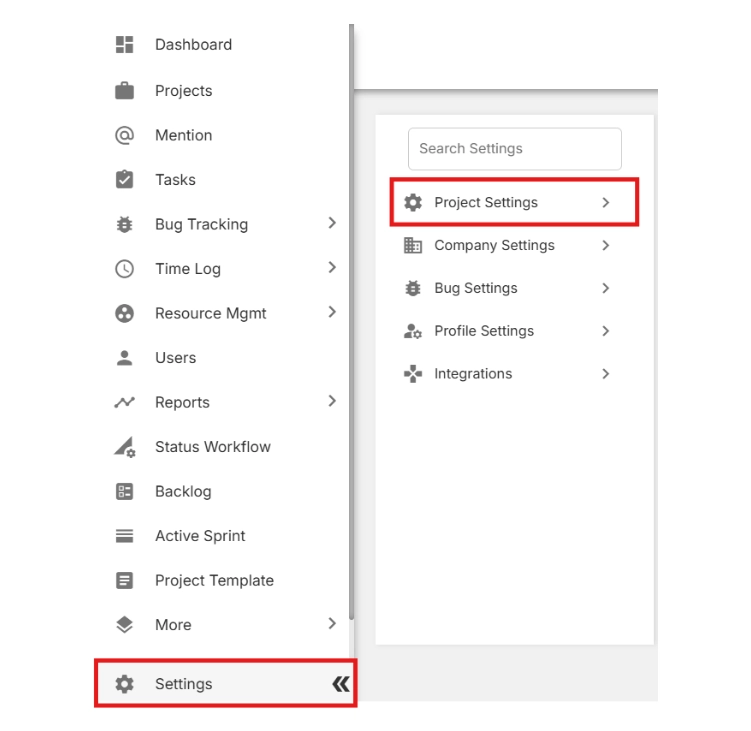
- From the left-side menu, scroll to the bottom and click Settings.
- Select Project Settings.
- Click on Import & Export.
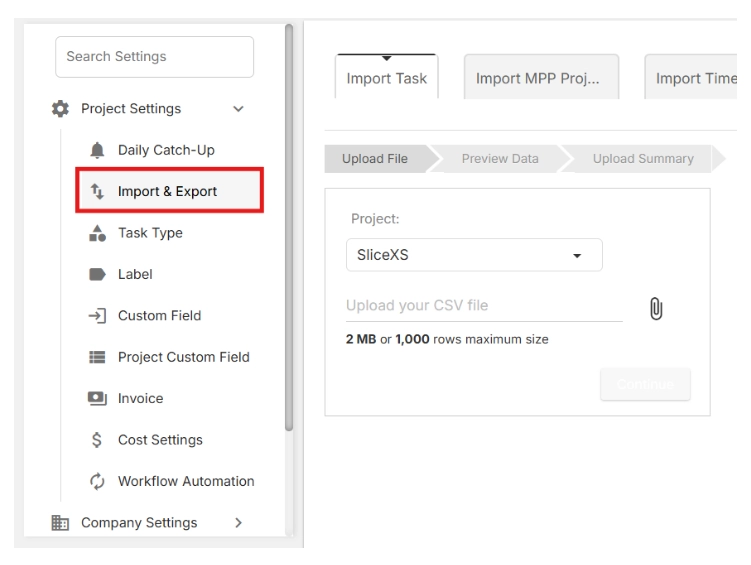
🔎 This is where you can both download the import template and upload your project data later.
- Click Download the sample file.