The Left Menu Settings in Orangescrum Cloud allow you to fully personalize your sidebar navigation.
You can decide which modules appear in your left menu, reorder them, or remove those you don’t use frequently — keeping your workspace clean and efficient.
This customization ensures that every user, from project managers to developers, can focus on the tools and views most relevant to their role.
Understanding the Interface
Available Menu Items
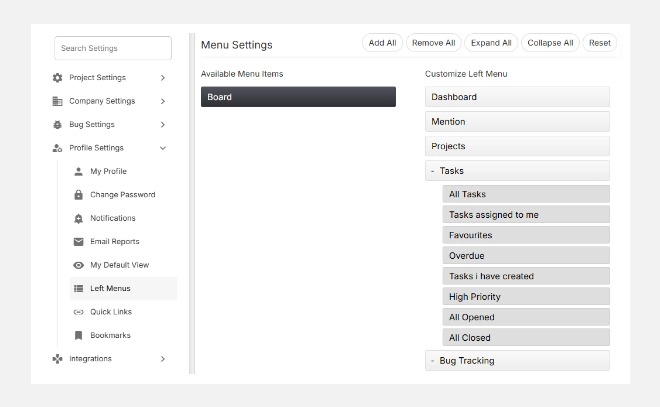
This section (on the left side) lists all the modules that are not currently part of your sidebar navigation. You can drag and drop or click to add them into your Customize Left Menu panel.
Customize Left Menu
This section (on the right side) shows the active items currently displayed in your sidebar.
You can:
- Add or remove modules like Dashboard, Projects, Tasks, Reports, etc.
- Expand or collapse menu groups such as Tasks, Reports, or Bug Tracking.
- Reorder modules based on priority using drag and drop.
Default Menu Options
Here are the commonly available modules that can be customized:
| Module | Description |
| Dashboard | View an overview of project performance and key metrics. |
| Mention | Access all mentions and communication directed to you. |
| Projects | Manage all ongoing and archived projects. |
| Tasks | Navigate to task lists, Kanban boards, and task creation screens. |
| Bug Tracking | Manage and track issues or bugs in one place. |
| Time Log | Log work hours, review timesheets, and track productivity. |
| Resource Mgmt | Monitor team workload and allocation. |
| Reports | Access project progress, timesheet, and performance reports. |
| Status Workflow | Customize task stages and approval flows. |
| Backlog | Review tasks and items planned for future sprints. |
| Active Sprint | Manage and track active sprint boards. |
| Project Template | Quickly create new projects using saved templates. |
Top Menu Actions
| Action | Description |
| Add All | Instantly add all available menu items to your sidebar. |
| Remove All | Clear the entire sidebar and start fresh. |
| Expand All / Collapse All | Expand or collapse all menu sections at once. |
| Reset | Restore your sidebar to the original default layout. |
How to Customize Your Sidebar
- Go to Settings → Profile Settings → Left Menus.
- Review available menu items on the left.
- Drag and drop items to the right (Customize Left Menu) panel or click Add All.
- Reorder modules based on your daily use.
- Click Save to apply changes.
Benefits
✅ Streamlined Navigation: Access the tools you need faster.
✅ Role-based Efficiency: Tailor your sidebar to match your workflow — whether you’re a developer, project manager, or QA.
✅ Declutter Your Workspace: Remove unused modules for a clean, distraction-free view.
With Left Menu Settings in Orangescrum Cloud, you design your own navigation experience — simple, fast, and completely personal.