The Single Sign-On (SSO) integration in Orangescrum Cloud enables users to securely access their workspace using existing organizational credentials.
It eliminates the need to remember multiple usernames and passwords, streamlining access while enhancing security for teams and enterprises.
With SSO, you can log in once through your company identity provider and instantly access Orangescrum — no separate password required.
Why enable SSO?
✅ Simplified Access: One secure login for all your applications.
✅ Enterprise-Grade Security: Centralized authentication and compliance with your company’s identity policies.
✅ Time-Saving: No need to reset forgotten passwords or manage separate credentials.
✅ Access Control: Admins can manage user access centrally via your identity provider (IdP).
How to Enable SSO in Orangescrum
- Navigate to Settings → Integrations → Single Sign-On (SSO).
- Click Enable SSO (if not already active).
- Choose your identity provider (e.g., Google Workspace, Microsoft Azure AD, Okta, or other SAML-supported IdPs).
- Follow the setup prompts to authenticate and authorize your workspace.
- Once enabled, all authorized users can log in using their company SSO credentials.
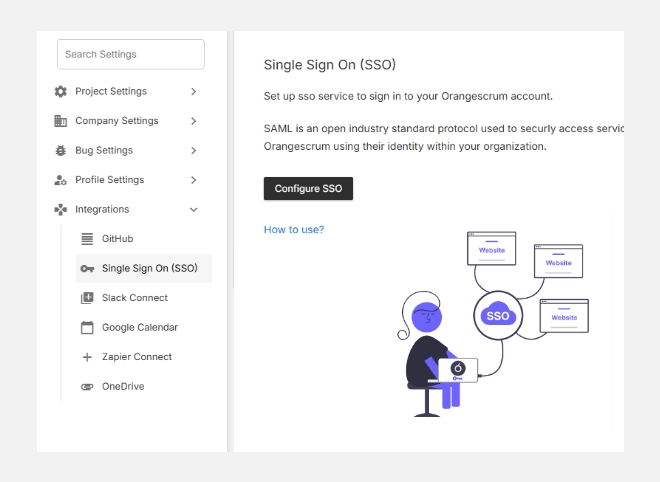
After successful setup, your page will show “Single Sign On (SSO) is Enabled” with options to Edit or Remove the configuration.
Managing Your SSO Integration
- Edit: Update configuration details, change IdP settings, or reauthenticate.
- Remove: Disable SSO and revert to standard Orangescrum email/password login.
If you remove SSO, users will need to log in with their original Orangescrum credentials.
Supported Identity Providers
| Provider | Authentication Type |
| Google Workspace | OAuth 2.0 |
| Microsoft Azure AD | SAML / OAuth |
| Okta | SAML 2.0 |
| OneLogin | SAML 2.0 |
| Custom SAML IdP | SAML Configuration |
Benefits of SSO for Organizations
✅ Centralized User Management: Control who can access Orangescrum via your company directory.
✅ Enhanced Compliance: Meet enterprise-grade security standards (SOC 2, ISO 27001, etc.).
✅ Reduced IT Overhead: Minimize password resets and helpdesk tickets.
✅ Faster Onboarding: Add or remove users instantly through your existing identity management system.
Summary
| Feature | Description |
| Single Login | Access Orangescrum using existing company credentials. |
| Secure Authentication | SAML/OAuth support for leading IdPs. |
| User Control | Centralized management of user access. |
| Edit/Remove Options | Easily update or disable SSO anytime. |
With Orangescrum SSO, you get enterprise-grade security, faster access, and complete control — all in one seamless login experience.