Bug Issue Type in Orangescrum Cloud helps teams differentiate between various kinds of reported items — such as bugs, improvements, feature requests, or general queries.
By defining specific issue types, you can manage work more efficiently, prioritize development, and generate accurate reports for QA and product analysis.
Example: When a user reports an “API timeout,” you can log it as a Bug, while a suggestion to “Add export to PDF” can be logged as an Improvement.
Why Use Issue Types
- Organize issues logically — separate bugs, tasks, enhancements, and queries.
- Improve reporting — generate more accurate defect and improvement metrics.
- Simplify tracking — quickly filter and assign items based on type.
- Align teams — ensure QA, dev, and product teams speak the same language.
Accessing Bug Issue Type Settings
- Go to Settings → Bug Settings → Issue Type.
- You’ll see the existing default issue types such as Bug, Improvement, and Query.
- You can activate, deactivate, or add new custom issue types anytime.
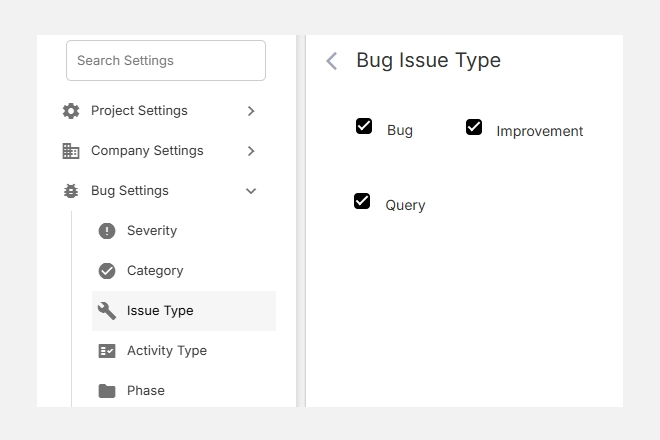
Default Issue Types
| Issue Type | Description | Example |
| Bug | A defect or error that breaks functionality or causes unexpected results. | Broken link, calculation error, crash on save. |
| Improvement | A request to enhance existing functionality. | Optimize dashboard speed, update email template. |
| Query | A question or clarification request that does not indicate a product fault. | “How does this filter work?” |
You can also create additional issue types such as Feature Request, Enhancement, or Change Request to suit your project workflow.
Adding a New Issue Type
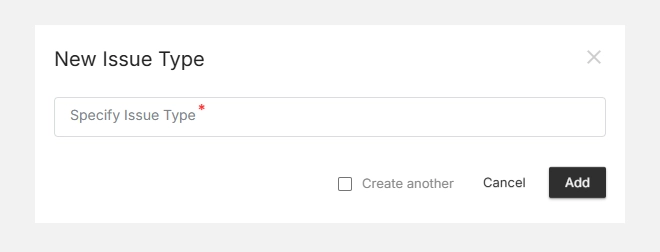
- Click + New Issue Type (top-right corner).
- Enter a clear Issue Type Name in the field (e.g., Enhancement, Task, Feature Request).
- Click Add to save it.
- Your new type will now appear in the list and can be selected when logging bugs or issues.
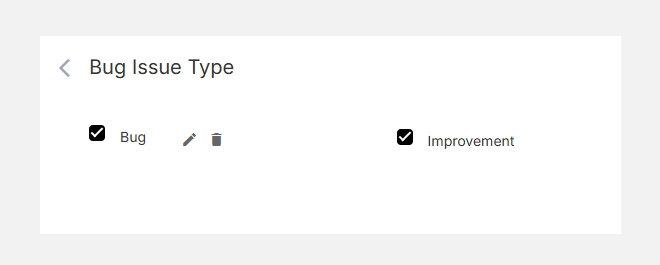
Editing or Deleting an Issue Type
- To Edit, hover over the issue type name and click the icon.
- To Delete, click the icon to remove it from your configuration.
- Deleting an issue type will not erase the associated issues but will unlink the classification.
Tip: Keep your issue types minimal (3–6) to avoid confusion and maintain reporting clarity.