Create new projects faster with ready-made workflows designed for different use cases.
Overview
The Project Templates feature in Orangescrum Cloud allows you to quickly create new projects using predefined structures, workflows, and configurations.
Each template is purpose-built for a specific project type—whether it’s Agile, content management, recruitment, or procurement—so your team can start working instantly without setting up everything from scratch.
Think of templates as plug-and-play project frameworks — ready to launch, customizable to fit your process.
Why Use Project Templates?
- Save time: No need to build new projects from scratch.
- Consistency: Standardize processes across teams and departments.
- Accuracy: Use pre-defined task types, workflows, and permissions aligned with your needs.
- Scalability: Perfect for growing teams managing multiple similar projects.
Accessing Project Templates
- Go to your Project Template in the left side menu.
- Click Create Project to launch a new project based on the chosen template.
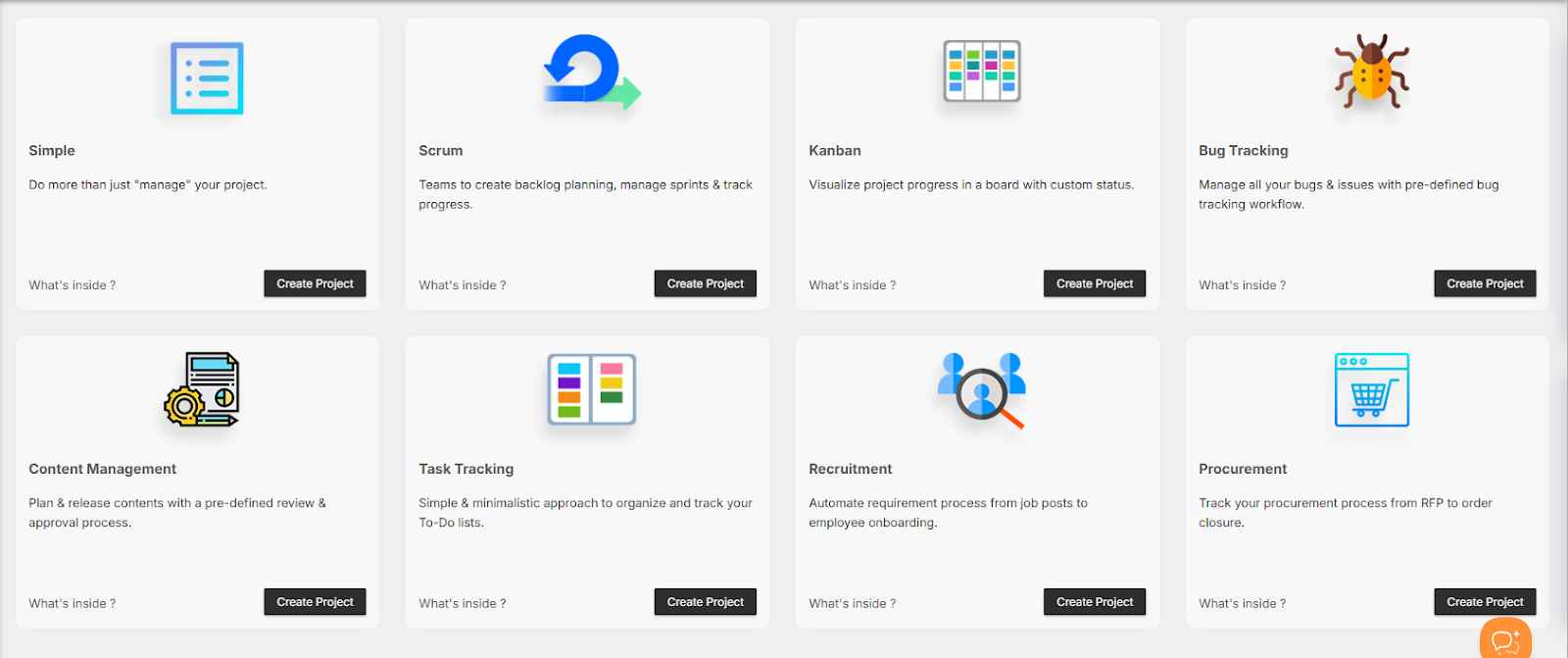
Available Project Templates
Orangescrum provides a variety of ready-to-use templates designed for different workflows and industries.
-
Simple Project Template
Best for: Small teams or general project management.
Description: Do more than just manage your project — track progress, tasks, and milestones easily.
Includes:
- Default task stages: To-Do, In Progress, Completed
- Basic task types and user permissions
- Ideal for quick, flexible project tracking
Use this for short-term or cross-functional internal projects.
-
Scrum Project Template
Best for: Agile teams managing sprints and product backlogs.
Description: Designed to help Agile teams create backlogs, manage sprints, assign story points, and monitor burndown charts.
Includes:
- Backlog and sprint boards
- Story points, velocity tracking, and sprint planning
- Task types like Epic, Story, Bug, Task
- Predefined Agile statuses (To-Do → In Progress → QA → Done)
Perfect for software, IT, and product development teams.
-
Kanban Project Template
Best for: Visual workflow management and continuous delivery.
Description: Visualize your process using a Kanban board with custom columns representing workflow stages.
Includes:
- Drag-and-drop task movement
- Configurable status columns
- Continuous work tracking with no fixed sprint cycles
Ideal for marketing, operations, or support teams.
-
Bug Tracking Template
Best for: QA and development teams managing bugs and issues.
Description: Track and resolve bugs efficiently with a predefined bug tracking workflow.
Includes:
- Bug categories and priorities (Critical, Major, Minor)
- Statuses: New → In Progress → Fixed → Verified → Closed
- Fields like Bug Origin, Resolution, Affect Version, Fix Version
Ensure software quality and issue transparency.
-
Content Management Template
Best for: Marketing, editorial, and content production teams.
Description: Plan, review, and publish content using a structured approval workflow.
Includes:
- Task stages: Idea → Draft → Review → Approved → Published
- Custom fields for content type, due date, and editor
- Collaboration-ready task comments and attachments
Perfect for blogs, marketing campaigns, and creative assets.
-
Task Tracking Template
Best for: Individual contributors and small teams managing daily to-do lists.
Description: A minimalistic template to organize and track personal or team tasks.
Includes:
- Simple task list and priority tags
- Statuses: Open, In Progress, Completed
- Option to add due dates, assignees, and attachments
Stay organized and keep work moving.
-
Recruitment Template
Best for: HR and recruitment teams managing hiring pipelines.
Description: Automate your recruitment process from job posting to candidate onboarding.
Includes:
- Stages: Application Received → Screening → Interview → Offer → Hired
- Task fields for candidate name, job title, and status
- Workflow reports for hiring progress tracking
Ideal for tracking applicants and streamlining hiring cycles.
-
Procurement Template
Best for: Finance, procurement, and operations teams.
Description: Track your procurement process from RFP to purchase order closure.
Includes:
- Task statuses: RFQ Sent → Quotation Received → Negotiation → Order Placed → Closed
- Vendor and item tracking fields
- Built-in cost visibility and document attachment options
Perfect for vendor coordination and budget control.
Customizing a Template
Once you create a project from a template, you can customize it fully:
- Rename or remove task stages
- Add or modify task types
- Assign roles and permissions
- Configure notifications and integrations
Each template serves as a foundation — you can build on top of it as your workflow evolves.
Duplicating or Reusing a Template
- Open an existing project.
- Click the Project Settings icon.
- Choose “Save as Template.”
- Enter a name and description.
- Your template is now available in the Project Templates list for reuse.
This feature is ideal for recurring project structures like campaigns, releases, or audits.
Benefits of Using Templates
| Benefit | Description |
| Speed | Launch new projects instantly without setup delays. |
| Standardization | Keep workflows consistent across teams and departments. |
| Productivity | Spend less time on setup, more on execution. |
| Scalability | Reuse successful project structures for new clients or initiatives. |
Best Practices
- Review each template’s workflow before creating a project.
- Create department-specific templates (e.g., HR, Marketing, IT).
- Use naming conventions for easy identification (e.g., Client-Onboarding-Template).
- Save frequently used configurations as custom templates.
Templates are reusable systems — refine them as your team grows.
Access Control
| Role | Permission |
| Admin | Create, edit, and delete templates. |
| Project Owner | Use templates to create projects. |
| User | View and join projects created from templates. |
Only admins can modify or remove default system templates.
Summary
| Template | Purpose |
| Simple | General project management. |
| Scrum | Agile sprint planning and backlog tracking. |
| Kanban | Visual workflow management. |
| Bug Tracking | QA and issue tracking. |
| Content Management | Editorial planning and approvals. |
| Task Tracking | Daily task organization. |
| Recruitment | Hiring pipeline management. |
| Procurement | Vendor and purchase process tracking. |
Project Templates in Orangescrum give your team a head start — standardizing workflows, boosting productivity, and ensuring every project begins with clarity and structure.