Plan smarter, collaborate faster, and deliver projects on time — every time.
Orangescrum Cloud is an all-in-one project management and collaboration platform designed to help teams plan, track, and deliver projects seamlessly — from concept to completion.
Whether you’re managing client projects, internal initiatives, or agile sprints, Orangescrum gives you the visibility, control, and tools you need to stay on track and hit every milestone.
From task creation to time tracking and reporting — manage your entire project lifecycle in one place.
Key Features of Orangescrum Project Management
Project Dashboard: Get a bird’s-eye view of all your projects, with instant access to progress summaries, active tasks, resources, and deadlines.
Task Management: Create, assign, and prioritize tasks. Break complex work into subtasks and use Kanban or List views to track progress easily.
Gantt Charts: Visualize your project timelines and dependencies. Reschedule tasks with drag-and-drop simplicity and keep delivery dates realistic.
Time Tracking: Log hours manually or with timers to monitor resource productivity and project billing accuracy.
Resource Management: Track workloads, balance team availability, and ensure no resource is over or underutilized.
Collaboration Tools: Communicate in real time through comments, file attachments, mentions, and activity feeds — all within the project workspace.
Agile Board: For teams running sprints — plan, execute, and review with agile boards, burndown charts, and velocity tracking.
Reports & Analytics: Generate insightful reports on project progress, productivity, and cost — helping you make data-driven decisions.
How to Create a Project in Orangescrum Cloud
- Navigate to Projects → Create New Projects.
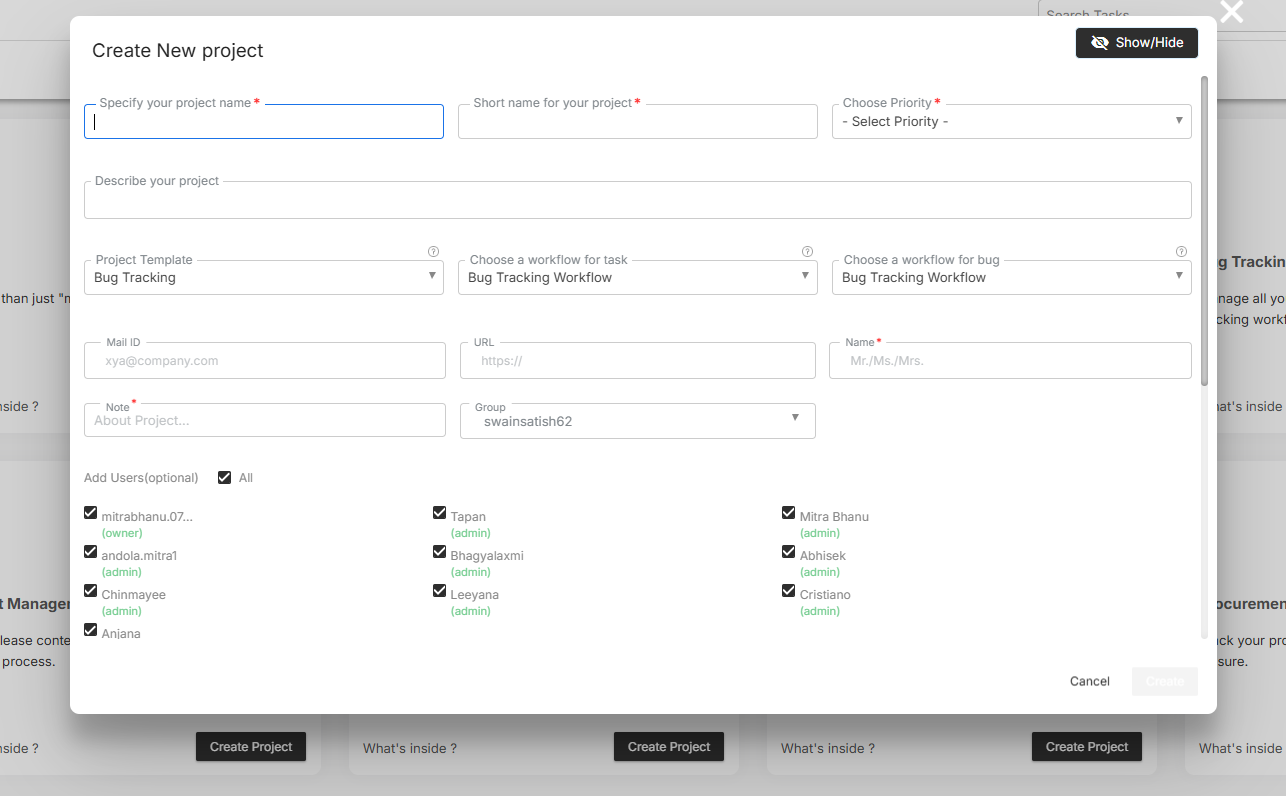
- Enter essential details:
- Project Name
- Start & End Dates
- Client/Owner
- Team Members
- Billing Type (if applicable)
- Add a Project Description and attach related files or notes.
- Click Save — your project workspace is now active!
- Start adding tasks, milestones, or discussions immediately.
You can create unlimited projects and organize them by department, client, or program.
Understanding the Project Dashboard
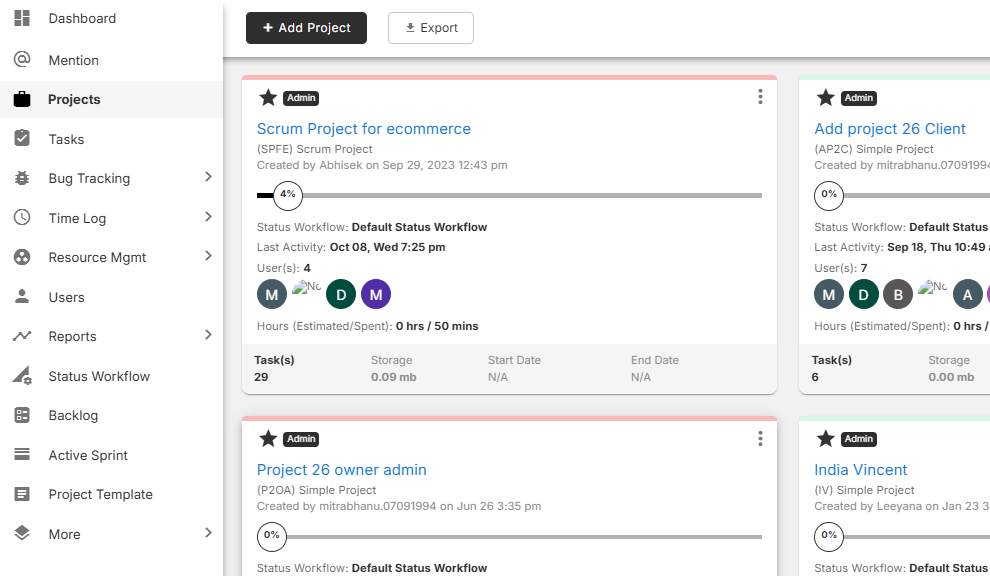
The Project Dashboard is your command center — displaying all active and archived projects in one place.
| Section | Description |
| Project Cards | Display key details such as title, owner, due date, and status. |
| Progress Bar | Shows completion percentage based on closed vs. open tasks. |
| Filters | Sort projects by owner, status, client, or due date. |
| Quick Actions | Edit, duplicate, or archive projects directly from the dashboard. |
Use search and filters to locate specific projects in seconds.
Managing Tasks Inside a Project
Within each project, tasks form the foundation of execution.
You can:
- Add tasks with due dates and priority levels.
- Assign tasks to team members.
- Use task groups or milestones for structured breakdowns.
- Switch between List, Kanban, Calendar, or Gantt views for flexibility.
- Track updates through activity streams and comments.
Every task can include attachments, checklists, and dependencies to ensure nothing falls through the cracks.
Collaborating with Your Team
Collaboration in Orangescrum happens naturally within the project space.
- Mention teammates using @username to alert them instantly.
- Attach documents, spreadsheets, or designs directly from OneDrive, Google Drive, or local files.
- Track all updates via real-time notifications.
- Use the Discussion Tab for project-wide communication threads.
Keep all project-related communication organized — no more scattered chats or lost emails.
Monitoring Progress and Performance
Use the built-in analytics to ensure your project stays aligned with timelines and goals.
- Project Summary Report: Task distribution, completion rate, and time utilization.
- Task Status Report: Overview of pending, ongoing, and completed tasks.
- User Productivity Report: Measure resource contributions and logged hours.
- Timesheet Reports: Evaluate billable vs. non-billable time.
Orangescrum’s live dashboards help managers identify bottlenecks and reallocate resources instantly.
Roles & Permissions
Assign roles to maintain control over data and actions:
| Role | Access Level |
| Admin | Full access to all projects, settings, and reports. |
| Project Owner | Manages specific projects, tasks, and team assignments. |
| User | Can view and manage assigned tasks. |
| Client / Guest | Limited visibility — ideal for status tracking and feedback. |
Custom role configurations are also supported in enterprise plans.
Integrations for Enhanced Project Management
Orangescrum Cloud integrates with your favorite tools to simplify project tracking and collaboration:
- Slack: Real-time project updates.
- OneDrive / Google Drive: File sharing.
- Zapier: Workflow automation.
- GitHub: Development updates.
- Google Calendar: Sync deadlines and events.
Integrations help your teams stay connected and reduce manual updates.
Summary
| Function | Description |
| Project Dashboard | View and manage all projects at a glance. |
| Task & Time Tracking | Assign work, log hours, and monitor progress. |
| Reports | Generate data-driven insights. |
| Collaboration | Keep communication and files in one place. |
| Integrations | Connect Orangescrum with Slack, Zapier, OneDrive, and more. |
With Orangescrum Cloud, project management becomes simple, visual, and productive — empowering your team to deliver faster and smarter.