Contact Support

We’re here to help — anytime you need assistance.

Overview

Whether you’re new to Orangescrum or a seasoned project manager, help is always just a click away.

The Support section gives you quick access to tutorials, help documents, FAQs, and direct assistance from our team — so you can resolve issues faster and keep your projects running smoothly.

Orangescrum Support is available for all users — from Free plans to Enterprise customers.

Where to Find Support

You can reach the Orangescrum Support team through multiple channels:

1. Help Center (Knowledge Base)

Explore detailed step-by-step documentation on every Orangescrum feature at the help portal.

You’ll find:

  • Product guides and tutorials
  • Troubleshooting articles
  • FAQ sections
  • Best practice resources

Start with our “Getting Started” and “Academy” modules for a guided learning experience.

2. Orangescrum Academy

Learn project management the Orangescrum way!

Our Academy portal offers in-depth training modules, including:

  • Agile project management
  • Time tracking & reporting
  • Video tutorials and product demos

Perfect for new users, admins, and teams who want to master productivity in Orangescrum.

3. Email Support

For issues requiring personal assistance or workspace-specific troubleshooting contact support@orangescrum.com

When emailing, please include:

  • Your workspace URL
  • A short description of the issue
  • Screenshots (if possible)
  • Your browser/device details

Our team responds within 24 business hours (faster for Enterprise users).

4. Enterprise Priority Support

If you’re on an Enterprise or Self-Hosted Plan, you get access to:

  • Dedicated Account Manager
  • Priority Ticket Resolution
  • Live Onboarding & Training Sessions
  • Custom Integration Support

Your team will have direct guidance from Orangescrum specialists.

How to Submit a Support Ticket

  1. Go to Help → Contact Support in the left navigation or bottom widget.
  2. Fill out the quick form:
    • Subject
    • Description of issue
    • Attach files or screenshots (optional)
  3. Click Submit Ticket.

Once submitted:

  • You’ll receive a confirmation email with a ticket number.
  • Our support representative will reach out within one business day.
  • You can reply directly via email to continue the conversation.

Keep your workspace active during troubleshooting for faster diagnosis.

Data & Privacy Support

  • All support requests are handled securely.
  • Your workspace data remains private and protected.
  • Only authorized personnel access your workspace for troubleshooting (with your consent).

We adhere to strict GDPR and data-protection standards.

Subscription & Billing

Easily manage your workspace plan, billing cycle, and user count from one place.

The Subscription & Billing section in Orangescrum Cloud allows the Account Owner to manage everything related to the workspace plan — including upgrades, downgrades, billing cycles, and user usage.

You can monitor your current plan, track user limits, and manage billing preferences with complete transparency and control.

Only the Account Owner has access to Subscription & Billing.

How to Access Subscription & Billing

  1. Log in to your Orangescrum Cloud account.
  2. Go to the Settings menu.
  3. Click on Subscription & Billing.
  4. You’ll see your current plan details, billing type, and user count.

Available Plans

Orangescrum currently offers three subscription plans:

Plan Ideal For Key Highlights
Personal Individuals or freelancers Basic task and project management features
Startup Small and growing teams Advanced task tracking, reports, and integrations
Professional Established teams Includes resource management, automation, and premium support

You can upgrade or downgrade your plan anytime based on your requirements.

Billing Cycles

Orangescrum supports two billing cycles:

Billing Type Description
Monthly Pay every month — ideal for teams that prefer flexibility.
Yearly Pay once a year — save more with a discounted rate.

You can switch between monthly and yearly billing anytime from the Subscription page.

Upgrading or Downgrading Your Plan

When Upgrading:

If you move to a higher plan during an ongoing billing cycle, the upgrade takes effect immediately. You’ll gain instant access to all features available in your new plan.

When Downgrading:

If you switch to a lower plan, the change will apply after your current billing cycle ends. Your existing plan and features will remain active until that period is over.

Managing Users and Billing Adjustments

When Adding Users:

If you add more users before the billing cycle ends, the system will recalculate the amount for the additional users, and charges will apply immediately.

Example: If you paid for 30 users but added 10 more during the cycle, the cost for the 10 new users will be prorated and billed right away.

When Removing Users:

If you reduce the number of users before completing your billing cycle, the difference will be automatically adjusted — you’ll get an extended access period based on the unused balance.

Managing Payments and Renewal

  • Review your plan and renewal date anytime under Settings → Subscription & Billing.
  • All payments are processed securely through trusted gateways.
  • Renewal happens automatically based on your billing frequency (Monthly / Yearly).

Summary

  • Accessible only by the Account Owner.
  • Manage your plan, users, and billing frequency easily from Settings.
  • Upgrades take effect immediately.
  • Downgrades and user reductions adjust after the billing cycle ends.
  • Transparent billing ensures no hidden charges.

Mobile Access

Manage your projects, tasks, and teams anytime, anywhere.

Overview

The Orangescrum Mobile App allows you and your team to stay productive on the go.

Whether you’re tracking progress, logging time, or checking updates — everything you do on desktop can now be done directly from your mobile device.

Stay connected with your projects 24×7 — monitor, collaborate, and act in real time.

App Availability

The Orangescrum app is available on:

Search for “Orangescrum Project Management” on your app store and install it for free.

Login & Authentication

You can sign in to your Orangescrum account using:

  • Email & Password (same credentials as the web version)
  • SSO (Single Sign-On) — if enabled for your workspace
  • Google or Microsoft Sign-in (for connected accounts)

Steps to log in:

  1. Open the Orangescrum app.
  2. Enter your workspace URL or company domain (e.g., yourteam.orangescrum.com).
  3. Log in with your credentials or preferred sign-in method.

Your login and data are protected by enterprise-grade SSL encryption.

Dashboard Overview

After logging in, you’ll land on your Dashboard, which provides a snapshot of:

  • Active projects
  • Assigned tasks
  • Pending deadlines
  • Recent activities and notifications

You can quickly switch between projects, view ongoing work, or start a new task directly from the dashboard.

Manage Tasks on Mobile

The mobile app provides a simplified yet powerful task management experience.

Create Tasks

  1. Tap Create Task.
  2. Enter the Task Title, Description, and Due Date.
  3. Assign it to a User and select a Project.
  4. Tap Save — the task will sync instantly to your web workspace.

View & Update Tasks

  • Tap any task to open its details.
  • Edit the title, change status, or update comments.
  • Attach files or screenshots directly from your device.

Task Filters & Views

  • Filter by Status, Assignee, Project, or Priority.
  • Sort by Due Date or Creation Date for better visibility.

Every change you make on mobile reflects instantly on the web — ensuring perfect sync.

Time Tracking on Mobile

Easily log and manage time entries while working in the field or remotely.

To log time:

  1. Open the Time Log tab.
  2. Select the Task you worked on.
  3. Add the Hours Spent and optional notes.
  4. Tap Submit.

To review your timesheet:

Go to Reports → Timesheet to see all logged hours.

Track work hours on the go for accurate project billing and reporting.

Projects & Team Collaboration

Access Your Projects

  • Tap the Projects tab to view all active, archived, or upcoming projects.
  • Drill down to see task lists, progress, and team assignments.

Collaborate in Real Time

  • Use Comments to communicate directly on tasks.
  • Mention teammates using @username for instant notifications.
  • Share attachments, screenshots, or documents straight from your phone.

No need to switch tools — chat, share, and collaborate inside Orangescrum.

Notifications & Alerts

Never miss an update!

The mobile app supports:

  • Push Notifications for new tasks, mentions, and updates.
  • Email Alerts (configurable in Notification Settings).
  • In-App Alerts for quick reference.

You can manage notification preferences via:
Profile Settings → Notifications

Stay informed without inbox overload.

Light & Dark Mode

Toggle between Light Mode and Dark Mode from your Profile menu for a comfortable viewing experience — especially during extended work hours.

Profile & Settings

Tap your Profile Icon to manage:

  • Personal information (name, email, phone number)
  • Time Zone & Language
  • Notification preferences
  • Password updates

Your preferences automatically sync across devices.

Offline Access

If you lose internet connectivity while working, Orangescrum temporarily saves your updates locally.

Once you’re back online, all changes are automatically synced to your workspace.

Work uninterrupted, even in low-network environments.

Supported Features Summary

Feature Availability
Create & Edit Tasks       ✅
Comment & Attach Files       ✅
Time Logging       ✅
Project Access       ✅
Resource & Team View       ✅
Notification Control       ✅
Offline Mode       ✅
Dark Mode       ✅

The mobile app focuses on speed, simplicity, and on-the-go efficiency.

Best Practices

  • Keep your app updated for new features and improvements.
  • Enable push notifications for time-sensitive project alerts.
  • Use mobile for quick check-ins, approvals, and updates.
  • For deeper reporting or admin controls, switch to the web version.

The mobile app complements your desktop workflow — giving you total control wherever you are.

Security

  • All data is encrypted in transit (SSL/TLS 1.2).
  • Two-factor authentication (2FA) available for secure access.
  • SSO and OAuth integrations supported for enterprise accounts.

Your workspace data is safe — even when you’re working remotely.

Troubleshooting

Issue Solution
Unable to log in Check workspace URL or reset password.
Push notifications not received Enable notifications from device settings.
Data not syncing Refresh the app or check your internet connection.
App crash or freeze Clear cache or reinstall the app.

If issues persist, contact support@orangescrum.com for assistance.

Summary

Capability Mobile Access Benefit
Task Management Create, edit, and monitor tasks in real time.
Collaboration Comment, share, and notify team members instantly.
Time Tracking Log hours while working remotely.
Notifications Stay updated with push alerts.
Sync Automatic updates across web and mobile.


Roles and Permissions

The Roles and Permissions feature in Orangescrum helps you define who can access what within your workspace.

It ensures teams collaborate effectively while keeping data secure — giving admins full control over user privileges, visibility, and actions.

Whether you’re managing small project teams or enterprise-level organizations, role-based permissions allow you to:

  • Control access to modules, projects, and data
  • Assign predefined or custom roles
  • Enable or restrict actions like edit, delete, or manage

For a detailed walkthrough — including how to create roles, manage permissions, and assign them to users —

Please visit the full documentation here:

Smart access management ensures smooth workflows and data protection across your organization.

Project Templates

Create new projects faster with ready-made workflows designed for different use cases.

Overview

The Project Templates feature in Orangescrum Cloud allows you to quickly create new projects using predefined structures, workflows, and configurations.

Each template is purpose-built for a specific project type—whether it’s Agile, content management, recruitment, or procurement—so your team can start working instantly without setting up everything from scratch.

Think of templates as plug-and-play project frameworks — ready to launch, customizable to fit your process.

Why Use Project Templates?

  • Save time: No need to build new projects from scratch.
  • Consistency: Standardize processes across teams and departments.
  • Accuracy: Use pre-defined task types, workflows, and permissions aligned with your needs.
  • Scalability: Perfect for growing teams managing multiple similar projects.

Accessing Project Templates

  1. Go to your Project Template in the left side menu.
  2. Click Create Project to launch a new project based on the chosen template.
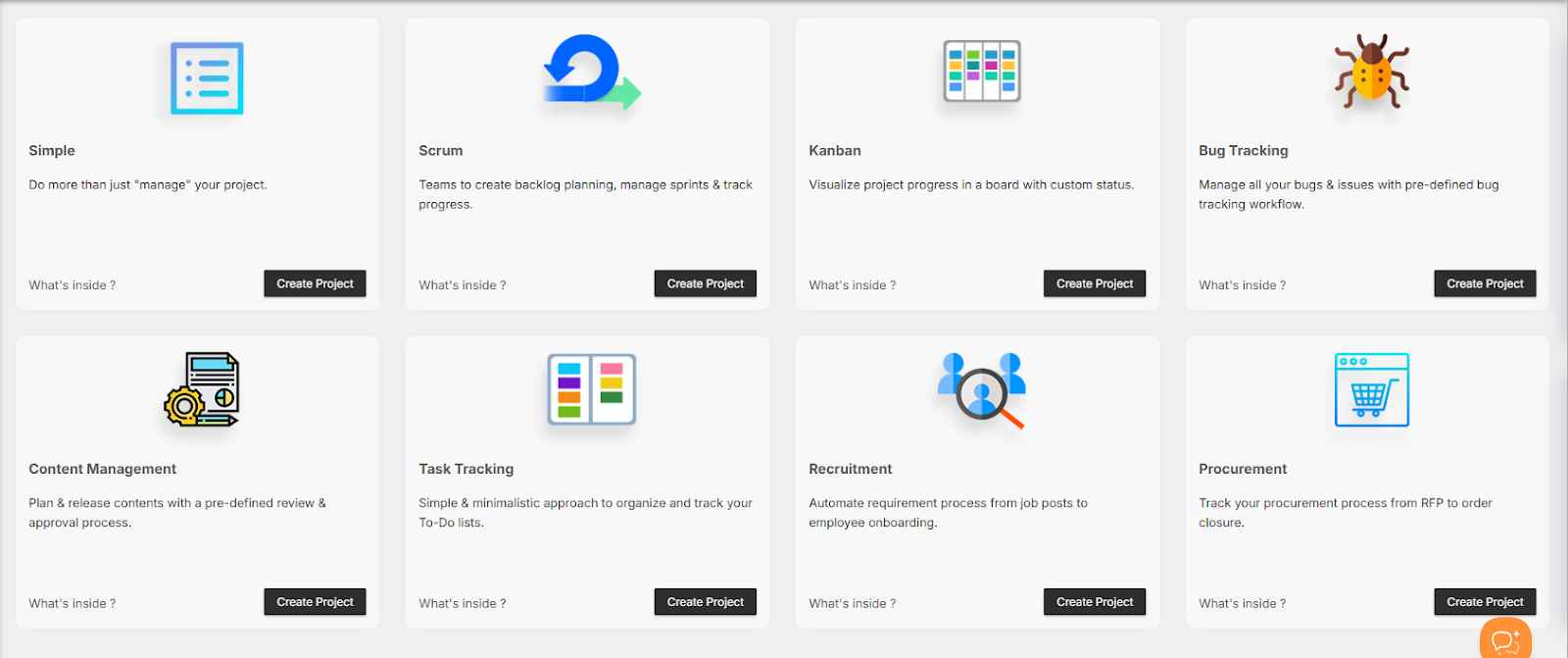
Available Project Templates

Orangescrum provides a variety of ready-to-use templates designed for different workflows and industries.

  • Simple Project Template

Best for: Small teams or general project management.

Description: Do more than just manage your project — track progress, tasks, and milestones easily.

Includes:

  • Default task stages: To-Do, In Progress, Completed
  • Basic task types and user permissions
  • Ideal for quick, flexible project tracking

Use this for short-term or cross-functional internal projects.

  • Scrum Project Template

Best for: Agile teams managing sprints and product backlogs.

Description: Designed to help Agile teams create backlogs, manage sprints, assign story points, and monitor burndown charts.

Includes:

  • Backlog and sprint boards
  • Story points, velocity tracking, and sprint planning
  • Task types like Epic, Story, Bug, Task
  • Predefined Agile statuses (To-Do → In Progress → QA → Done)

Perfect for software, IT, and product development teams.

  • Kanban Project Template

Best for: Visual workflow management and continuous delivery.

Description: Visualize your process using a Kanban board with custom columns representing workflow stages.

Includes:

  • Drag-and-drop task movement
  • Configurable status columns
  • Continuous work tracking with no fixed sprint cycles

Ideal for marketing, operations, or support teams.

  • Bug Tracking Template

Best for: QA and development teams managing bugs and issues.

Description: Track and resolve bugs efficiently with a predefined bug tracking workflow.

Includes:

  • Bug categories and priorities (Critical, Major, Minor)
  • Statuses: New → In Progress → Fixed → Verified → Closed
  • Fields like Bug Origin, Resolution, Affect Version, Fix Version

Ensure software quality and issue transparency.

  • Content Management Template

Best for: Marketing, editorial, and content production teams.

Description: Plan, review, and publish content using a structured approval workflow.

Includes:

  • Task stages: Idea → Draft → Review → Approved → Published
  • Custom fields for content type, due date, and editor
  • Collaboration-ready task comments and attachments

Perfect for blogs, marketing campaigns, and creative assets.

  • Task Tracking Template

Best for: Individual contributors and small teams managing daily to-do lists.

Description: A minimalistic template to organize and track personal or team tasks.

Includes:

  • Simple task list and priority tags
  • Statuses: Open, In Progress, Completed
  • Option to add due dates, assignees, and attachments

Stay organized and keep work moving.

  • Recruitment Template

Best for: HR and recruitment teams managing hiring pipelines.

Description: Automate your recruitment process from job posting to candidate onboarding.

Includes:

  • Stages: Application Received → Screening → Interview → Offer → Hired
  • Task fields for candidate name, job title, and status
  • Workflow reports for hiring progress tracking

Ideal for tracking applicants and streamlining hiring cycles.

  • Procurement Template

Best for: Finance, procurement, and operations teams.

Description: Track your procurement process from RFP to purchase order closure.

Includes:

  • Task statuses: RFQ Sent → Quotation Received → Negotiation → Order Placed → Closed
  • Vendor and item tracking fields
  • Built-in cost visibility and document attachment options

Perfect for vendor coordination and budget control.

Customizing a Template

Once you create a project from a template, you can customize it fully:

  • Rename or remove task stages
  • Add or modify task types
  • Assign roles and permissions
  • Configure notifications and integrations

Each template serves as a foundation — you can build on top of it as your workflow evolves.

Duplicating or Reusing a Template

  1. Open an existing project.
  2. Click the Project Settings icon.
  3. Choose “Save as Template.”
  4. Enter a name and description.
  5. Your template is now available in the Project Templates list for reuse.

This feature is ideal for recurring project structures like campaigns, releases, or audits.

Benefits of Using Templates

Benefit Description
Speed Launch new projects instantly without setup delays.
Standardization Keep workflows consistent across teams and departments.
Productivity Spend less time on setup, more on execution.
Scalability Reuse successful project structures for new clients or initiatives.

Best Practices

  • Review each template’s workflow before creating a project.
  • Create department-specific templates (e.g., HR, Marketing, IT).
  • Use naming conventions for easy identification (e.g., Client-Onboarding-Template).
  • Save frequently used configurations as custom templates.

Templates are reusable systems — refine them as your team grows.

Access Control

Role Permission
Admin Create, edit, and delete templates.
Project Owner Use templates to create projects.
User View and join projects created from templates.

Only admins can modify or remove default system templates.

Summary

Template Purpose
Simple General project management.
Scrum Agile sprint planning and backlog tracking.
Kanban Visual workflow management.
Bug Tracking QA and issue tracking.
Content Management Editorial planning and approvals.
Task Tracking Daily task organization.
Recruitment Hiring pipeline management.
Procurement Vendor and purchase process tracking.

Project Templates in Orangescrum give your team a head start — standardizing workflows, boosting productivity, and ensuring every project begins with clarity and structure.
Reports & Analytics

The Reports & Analytics module in Orangescrum Cloud offers a wide range of project and team performance insights through visual reports and detailed data breakdowns.

It empowers teams, managers, and executives to monitor progress, identify bottlenecks, and make informed decisions for continuous improvement.

Track what’s working, fix what’s not, and plan your next move smarter.

Types of Reports

Orangescrum divides reports into three major categories:

  • Task Analysis Reports – Understand task trends, resolution time, and workflow performance.
  • Time & Resource Reports – Evaluate how your team spends time and resources.
  • Agile & Others Reports – (For Scrum boards, backlog velocity, and sprint analytics).

Task Analysis Reports

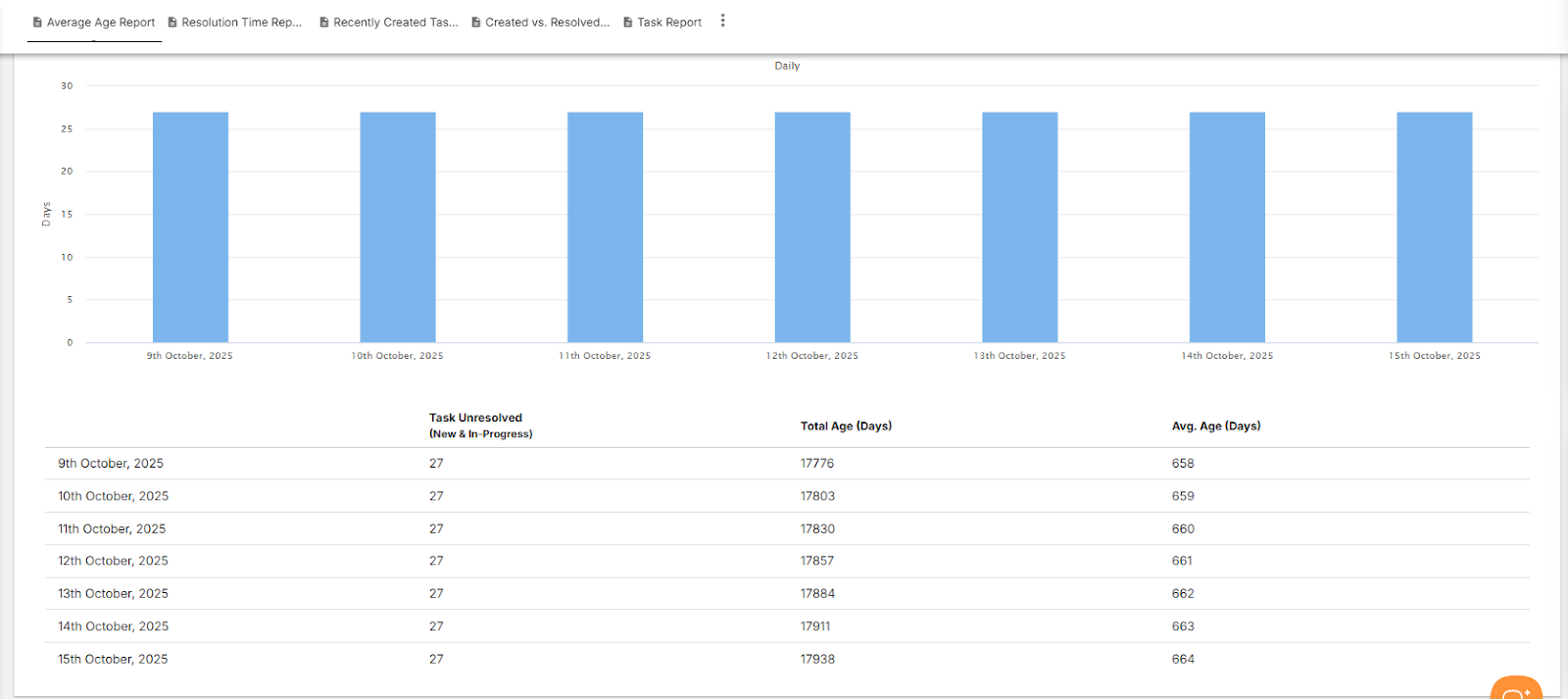
1. Average Age Report

Purpose: Displays the average number of days open tasks have been active in each project.

Why it matters: Helps you track backlog health and identify long-pending work.

How to use:

  • Select a Project Name.
  • Choose Period (Daily, Weekly, Monthly).
  • Set the Days Previously range (e.g., last 7 or 30 days).
  • Click Submit to generate the report.

Insights Provided:

  • Average task age in days
  • Total unresolved (new & in-progress) tasks
  • Task aging trend line

Use this to ensure older tasks don’t clog your backlog.

2. Resolution Time Report

Purpose: Tracks how long tasks take to be resolved from creation to closure.

Why it matters: Measures team efficiency and adherence to delivery timelines.

How to use:

  • Select a Project Name and Period (Daily, Weekly, Monthly).
  • Choose how many Days previously you want to analyze.
  • Click Submit to view resolution trends.

Insights Provided:

  • Total resolution time (in days)
  • Average resolution time per task
  • Planned vs. actual closure comparison

A must-have metric for understanding delivery speed.

3. Recently Created Tasks Report

Purpose: Shows how many new tasks have been created within a selected date range.

Why it matters: Helps managers assess workload inflow and plan allocations.

How to use:

  • Choose Project Name → Select Period (Daily/Weekly) → Define Days Previously → Click Submit.

Insights Provided:

  • Count of unresolved (new & in-progress) vs. resolved & closed tasks
  • Trendline showing task creation frequency

Ideal for sprint planning and monitoring task inflow rates.

4. Created vs. Resolved Tasks Report

Purpose: Compares how many tasks were created versus resolved over a specific period.

Why it matters: Indicates whether your team is keeping up with its workload.

How to use:

  • Select Project Name, Period, and Days Previously.
  • Toggle Cumulative Totals to view aggregated trends.

Insights Provided:

  • Daily or cumulative count of created and resolved tasks
  • Backlog growth or reduction trends

Balance your team’s output with incoming work for better backlog control.

5. Bug Report

Purpose: Tracks bug discovery, closure, and severity trends across projects.

Why it matters: Provides QA and product managers visibility into product quality and issue resolution rate.

How to use:

  • Select Start Date and End Date.
  • Click Submit to view charts and trends.

Insights Provided:

  • Bug Trend Chart (Opened vs. Closed)
  • Bug Status Chart (Open, In Progress, Fixed, Closed)
  • Bug Severity Chart (Critical, Major, Minor, Trivial)

A complete quality snapshot for your software projects.

6. Time Since Task Report

Purpose: Tracks how long tasks have remained open, in progress, or completed.

Why it matters: Highlights slow-moving tasks or workflow bottlenecks.

How to use:

  • Select a Project, Date Field (Created, Updated, or Closed), Period, and Days Previously.
  • Click Submit to generate a time-based trend chart.

Insights Provided:

  • Task count by creation/completion date
  • Duration analysis of work in progress
  • Cumulative trends for comparison

Great for understanding your project’s task turnaround time.

Time & Resource Reports

Accessible from the Time & Resource Reports section in the Reports module.

1. Hour Spent Report

Purpose: Shows a burn-down chart of total time and effort spent by resources on different tasks and task types.

Why it matters: Enables managers to visualize productivity and track effort across teams.

Insights Provided:

  • Time spent by each user or team
  • Breakdown by task type (Bugs, Features, Improvements)
  • Cumulative time spent vs. tasks closed

Quickly see if effort aligns with project goals.

2. Timesheet Report

Purpose: Consolidates all logged working hours by user, project, and task.

Why it matters: Essential for payroll, billing, and performance tracking.

Insights Provided:

  • Estimated vs. Logged hours
  • Billable vs. Non-Billable time
  • Submitted, Approved, and Rejected timesheets

Ideal for tracking productivity and financial compliance.

3. Profitability Report

Purpose: Provides a summary of budgets, costs, and income for all active projects.

Why it matters: Helps management evaluate financial health and profitability at a glance.

Insights Provided:

  • Budget allocation and utilization
  • Cost of resources vs. earned revenue
  • Profit margin trends

Measure your project ROI with precision.

Agile & Scrum Reports

For teams using Orangescrum’s Agile Boards, this section displays sprint performance metrics such as:

  • Sprint Velocity
  • Burndown Charts
  • Story Points Completed
  • Workload by Sprint

Enable continuous improvement in Agile workflows.

Exporting Reports

All reports in Orangescrum can be exported for review, presentations, or audits.

Steps:

  1. Open any report view.
  2. Apply filters (Date, Project, Resource, etc.).
  3. Click Export → CSV or PDF.

Exports retain chart data and column structures for easy offline analysis.

Filters & Customization

Each report allows you to fine-tune data using:

Filter Description
Project Name Choose specific projects to analyze.
Date Range Set start and end dates for custom periods.
Period Daily, Weekly, Monthly summary views.
Cumulative Totals Show aggregated or daily data points.
Days Previously Define retrospective analysis duration (e.g., last 7 days).

Flexible filters let you drill down into exactly what you need.

Best Practices

  • Schedule weekly report reviews with your team.
  • Use “Created vs. Resolved” to balance incoming and outgoing workloads.
  • Review “Bug Reports” before every release cycle.
  • Monitor “Resolution Time” to maintain healthy SLAs.
  • Track “Profitability” monthly for accurate financial reporting.